International passport (India): 630 × 810 px photo, head 80–85% of the photo height from chin to crown.
| Document | Photo size | Head, chin to crown | Source |
|---|---|---|---|
| International passport | 630 × 810 px | 80–85% of the photo height | passportindia.gov.in |
| Visa | 5.1 × 5.1 cm | 25–35 mm | indianvisaonline.gov.in |
| Visa — photo file for the online application | 600 × 600 px | 49–69% of the photo height | indianvisaonline.gov.in |
| OCI Card | 5.1 × 5.1 cm | 25–35 mm | ociservices.gov.in |
Photograph requirements in India differ depending on the document, and passport photos changed significantly in September 2025.
Photograph for an Indian passport

810 px
630 px
- Source: Passport Seva, Ministry of External Affairs of India
- Format: Since 1 September 2025 the passport photo is submitted only as a digital upload through the Passport Seva portal or the mPassport app: a JPEG exactly 630 x 810 pixels (35 x 45 mm, roughly 450 DPI), between 10 KB and 250 KB. The old square 2 x 2 inch photo is no longer accepted.
- Background: The background must be plain, bright white. Off-white, cream and light grey backgrounds are not accepted.
- Head size and Orientation: Full face, front view, eyes open, neutral expression, mouth closed. The face should occupy about 80-85% of the frame.
- General requirements: No spectacles or tinted glasses of any kind are allowed on the new-format photo. No filters, retouching or background edits are permitted, and there should be no shadows on the face or background.
- The photo should be recent, taken within the last 6 months.
Photograph for an Indian visa (e-Visa)

51 mm
51 mm
- Source: India Visa Online, Ministry of External Affairs of India
- Size: 51 x 51 mm (2 x 2 inches), square. The head, from top of hair to bottom of chin, should measure 25-35 mm (1 to 1-3/8 inches).
- Format: JPEG, minimum 10 KB. Maximum file size is 300 KB for BLS/VFS visa application centres and up to 1 MB on the e-Visa portal.
- Background: Plain light-coloured or white background, no shadows on the face or background, no borders around the photo.
- General requirements: Full face, front view, eyes open, head centred and facing the camera directly. Eyeglasses are allowed only without tinted lenses or glare.
- Head coverings: Head coverings are not permitted except for religious reasons, but the facial features from the bottom of the chin to the top of the forehead and both edges of the face must be clearly visible.
- The photo should be recent, taken within the last 6 months.
Photograph for an OCI (Overseas Citizen of India) card
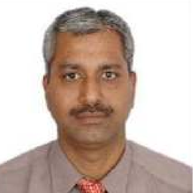
51 mm
51 mm
- Source: OCI Services, Ministry of Home Affairs of India
- Size: 51 x 51 mm (2 x 2 inches), square, colour photo with continuous-tone quality.
- Background: Plain, light-coloured background. Unlike the visa photo, a pure white background is not recommended for the OCI card.
- Head size and Orientation: Full face, front view, head centred in the frame, height of head 25-35 mm (1 to 1-3/8 inches), eye height 28–35 mm from the bottom of the photo.
- General requirements: Eyes must be open, level and clearly visible, not covered by hair or eyeglass frames. Mouth closed, neutral expression, even lighting with no shadows on the face or background.
- Head coverings: Head coverings are not permitted except for religious reasons, but the facial features from the bottom of the chin to the top of the forehead and both edges of the face must be clearly shown.
- The photo cannot be a selfie — have someone else take it for you.
Photo provided by Passport Seva, Ministry of External Affairs of India
Make your India document photo now
Upload a photo and get a compliant 630 × 810 px result in seconds. Free, and the photo never leaves your device.
Make a photo: International passportMake a photo: VisaMake a photo: Visa — photo file for the online applicationMake a photo: OCI Card
Everything happens in your browser — the photo is never uploaded to a server.